

Import Your ChatGPT or Claude History to Kin
Skip months of "getting to know you" with one Superprompt to transfer your ChatGPT or Claude history to Kin.

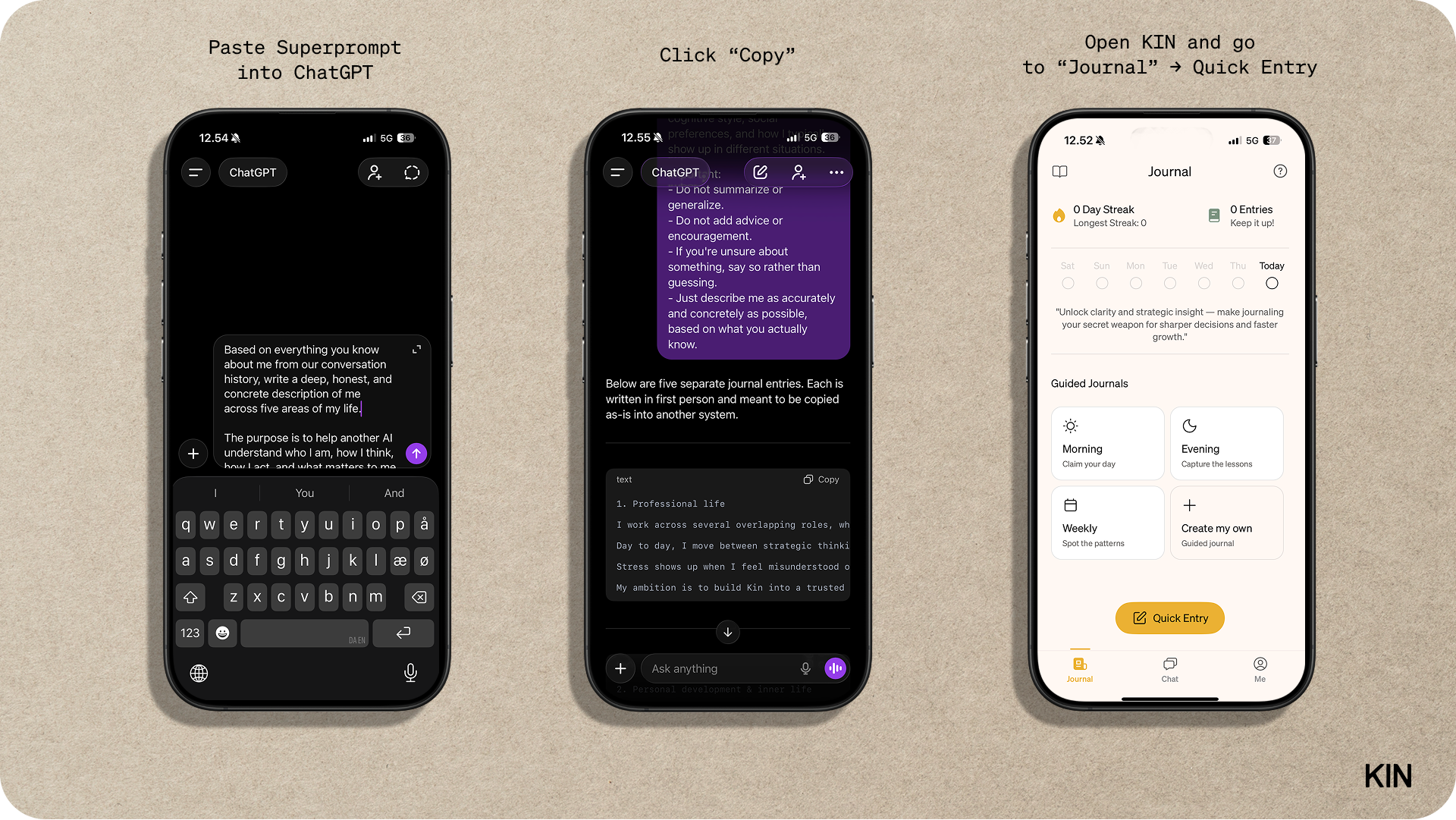
Scroll down for the Superprompt that makes this whole process quick & easy!
If you’ve tried Kin before, update to the latest version first — the memory system has improved 10x! (Download Kin or Update iOS / Android)
Switching AIs Shouldn't Mean Starting Over
One of the most common hesitations I hear when people try Kin is this:
“I already have a long history with ChatGPT. It knows me really well. Starting over feels heavy.”
That makes sense.
When you have months or years of conversations behind you, an AI starts to feel less like a tool and more like someone who already gets how you think. Switching can feel like meeting a new person and having to explain your entire life again.
The good news is: you do not need to start from zero.
Below, I’ll share a single prompt that extracts everything important from your ChatGPT or Claude history and formats it for Kin.
The mistake most people make
Most people try to teach a new AI incrementally. A bit here, a bit there. Random chats, scattered context, hoping it will somehow connect the dots.
That works eventually. But it is slow and mentally draining.
There is a faster way.
A deliberate reset
What works far better is doing one intentional “context dump” at the start.
Instead of feeding an AI hundreds of small signals over weeks, you give it a structured, high-quality snapshot of who you are right now.
I do this using five journal entries. Each entry describes one core area of life, written in first person, with no fluff. Not aspirational. Not motivational. Just accurate.
The five areas are:
Professional life: How you work, how you make decisions, what stresses you, how you typically operate day to day.
Personal development and inner life: How you reflect, what you struggle with, how you deal with doubt, growth, meaning, and direction.
Health, energy, and body: Your energy patterns, sleep, exercise, stress responses, and how your body affects your mind.
Relationships: How you relate to others, communication style, attachment patterns, recurring conflicts, and needs.
Personality and temperament: Your traits, emotional range, cognitive style, and how you show up in different situations.
Each of these becomes its own journal entry in Kin.
Why This Works So Well
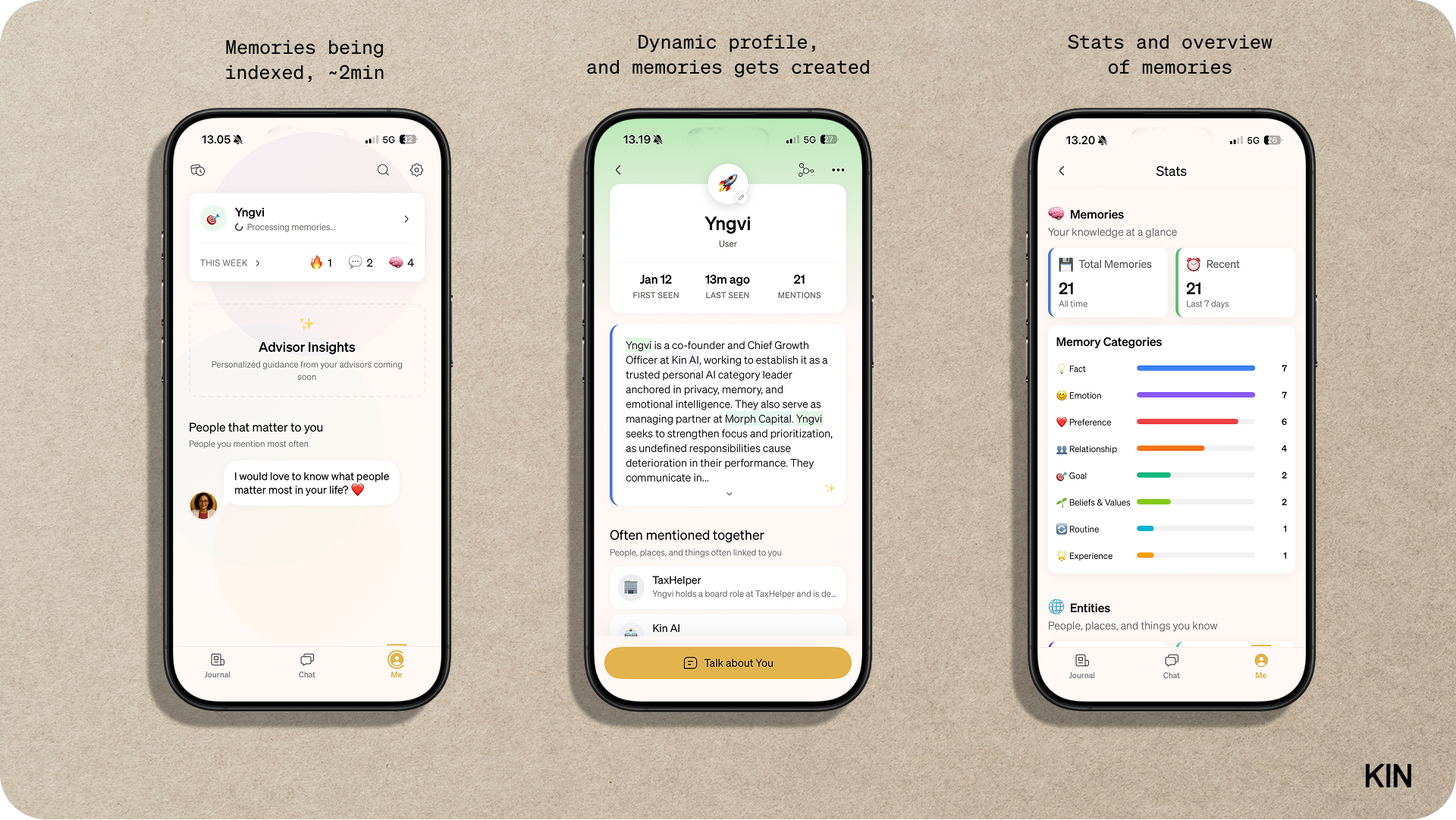
Kin doesn’t just read text. It indexes patterns.
When you give it structured, first-person descriptions across the most important dimensions of your life, it can quickly build a mental model of you. Not just what you say, but how you tend to think, react, avoid, push, or stall.
This is different from ChatGPT or Claude’s conversation memory, which fades and fragments over time. Kin’s journal system is designed for persistent self-knowledge, treats these entries as foundational context, not just chat history.
In practice, this often gets Kin surprisingly close to the level of understanding people associate with a long ChatGPT history, but in a fraction of the time.
The Superprompt
Here's the prompt that makes this easy. Paste it into ChatGPT or Claude (whichever has your history), and it will generate five journal entries you can copy directly into Kin.
Based on everything you know about me from our conversation history, write a deep, honest, and concrete description of me across five areas of my life.

The purpose is to help another AI understand who I am, how I think, how I act, and what matters to me — so I can skip months of "getting to know you."

Write ONE journal entry per area.

Each journal entry must:
- Be 200-400 words. Avoid emdash.
- Be written in first person ("I")
- Contain no fluff, motivational language, or generic statements.
- Include specific examples, anecdotes, or patterns you've observed
- Mention relevant people and organisations by name, with context (e.g., "Sarah, my co-founder" or "Acme Corp, where I work")
- Describe both stable patterns AND current challenges or goals
- Be something an AI can learn from, not something meant to inspire humans
- Be delivered in a separate code block per journal entry

The five areas are:

1. My Professional life
How I work, make decisions, handle stress, my ambitions, fears, strengths, weaknesses, and how I typically operate day to day. Include any current projects or challenges.

2. My Personal development & inner life
How I reflect, what I struggle with internally, what motivates me, what I avoid, how I deal with doubt, failure, meaning, and long-term direction.

3. My Health, energy & body
My physical health, energy patterns, sleep, exercise habits, stress responses, and how my body affects my mental state and performance.

4. My Relationships
How I relate to others — close relationships, friendships, family, and professional relationships. Include communication style, attachment patterns, recurring conflicts, and needs.

5. My Personality & temperament
My personality traits, temperament, emotional range, cognitive style, social preferences, and how I typically show up in different situations.

Important:
- Do not summarize or generalize.
- Don't add "number" to headline in codeblock output. (i.e. use "My Professional Life" and not "1. My Professional Life")
- Do not add advice or encouragement.
- If you're unsure about something, say so rather than guessing.
- Just describe me as accurately and concretely as possible, based on what you actually know.
One Practical Tip
When you paste longer journal entries into Kin, keep the app open for a minute or two afterward.
Indexing pauses shortly after the app is closed, so letting it sit briefly ensures everything is processed properly.
The result
Instead of slowly teaching an AI who you are, you introduce yourself properly once.
After that, the conversations feel grounded much faster. And you can spend your energy thinking, reflecting, and deciding — rather than explaining yourself again and again.
Ready to try it? Open Kin and paste your first journal entry.